
Applying healthcare kiosks in hospitals is becoming a direction many hospitals choose to address familiar operational problems: crowded waiting halls, manual measurement processes, fragmented data and staffing pressure. In the smart hospital model, healthcare kiosks help digitize the patient journey and improve operational efficiency.
However, not all healthcare kiosks serve the same function. Registration kiosks usually focus on identification, queue numbering and patient intake. Meanwhile, Kingston Healthcare Technologies' Medi-Kiosk is designed to support health indicator measurement, data digitization and connected screening workflows.
📋 Below are the operational challenges that hospitals commonly consider when deploying healthcare kiosks in hospitals with the Medi-Kiosk solution from Kingston Healthcare Technologies
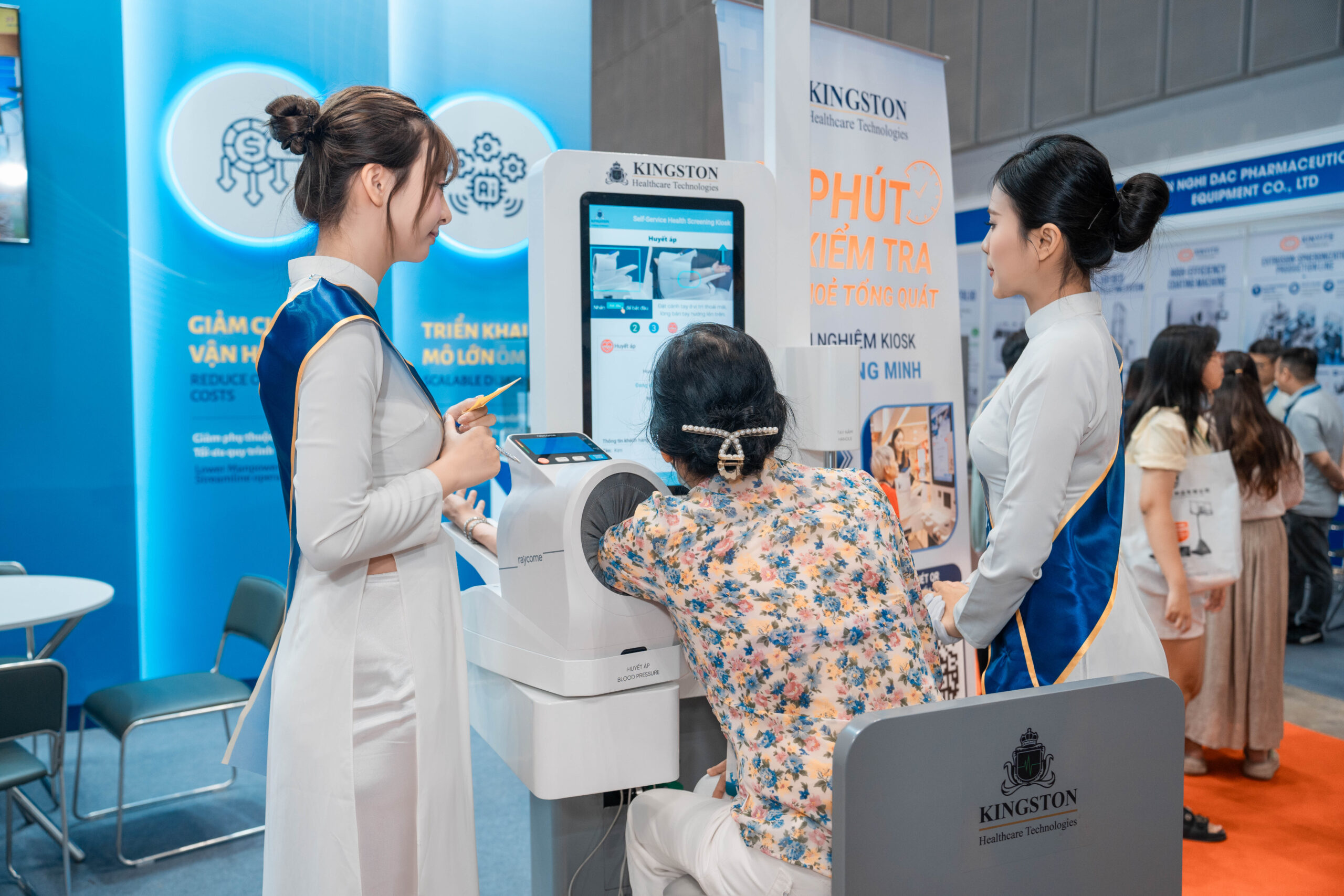
A staff member guides a patient in using Medi-Kiosk to measure health indicators
1. Healthcare Kiosks Help Reduce Congestion in Intake and Screening Areas
During peak hours, the intake area is often crowded with patients waiting to register, confirm their information, get a queue number and complete initial measurements.
Healthcare kiosks can add a self-service channel, allowing patients to complete some basic steps without waiting at the counter.
Depending on the deployment model, hospitals can combine:
A clear separation of functions makes operations more efficient. Registration Kiosk helps resolve administrative bottlenecks, while Medi-Kiosk focuses on screening and health data collection. This is also why many hospitals deploy both types of kiosks at the same time to optimize the use of healthcare kiosks in each functional area.
2. Automating Health Indicator Measurement
In the traditional process, patients may have to move between several separate desks to measure height, weight, blood pressure, heart rate, SpO₂ and temperature. This clearly shows the value of healthcare kiosks in hospitals in automating the measurement process.
Medical staff then have to record or re-enter each result into the system. As patient numbers grow, the measurement step can become a new bottleneck.
Medi-Kiosk integrates multiple measuring devices in a single station. The screen guides users through each step, while results are recorded directly in the system.
Depending on the configuration, Medi-Kiosk can support indicators such as:
Other modules can be explored based on each project’s requirements. The actual configuration should be chosen based on the hospital’s screening goals, specialties and processes.
3. Reducing Manual Data Entry and Minimizing Errors
When using multiple standalone devices, medical staff often have to read the results, write them on a form and then re-enter them into the software. This is one of the reasons healthcare kiosks in hospitals are attracting growing interest as a way to reduce errors from manual data entry.
This process is not only time-consuming but can also lead to errors such as:
When Medi-Kiosk is connected to a management platform, data can be recorded automatically and linked to the user’s record.
This helps hospitals:
The value of a kiosk therefore lies not only in automated measurement, but also in turning scattered readings into structured data that can continue to be used in the examination process. This is the core value of healthcare kiosks in hospitals for daily screening activities.
4. Supporting Data Connectivity with Hospital Systems
One of the key factors when evaluating a healthcare kiosk is its ability to integrate with the existing software infrastructure. Compliance with international healthcare data exchange standards such as HL7 FHIR makes integration between the kiosk and hospital systems smoother.
Depending on the project scope, data from Medi-Kiosk can be evaluated for connection with:
However, you should not assume a kiosk can connect to every system right away. Integration capability depends on:
Therefore, the IT Department should be involved from the assessment stage to evaluate compatibility and develop a suitable connection plan.
5. Supporting Patient Navigation and Flow Management
After completing registration or measurements, many patients do not know where to go or what to do next.
This increases the number of questions at the counter, disrupts patient flow and adds pressure on intake staff.
Depending on the configured process, the kiosk system can display:
If a result falls outside the reference range or the signal quality does not meet requirements, the system can request a re-measurement or forward the information to the staff in charge.
The kiosk only supports screening and navigation according to processes approved by the hospital; it does not diagnose or prescribe treatment on its own. This ensures that healthcare kiosks in hospitals always remain safe and compliant with approved clinical procedures.
6. Providing Data for Operations Management
When intake and measurement steps are done manually, hospitals often find it hard to accurately assess the following. This is another important aspect of healthcare kiosks in hospitals that operations management teams need to monitor closely:
A kiosk management platform can help track operational data such as:
This data helps the Board of Directors, the General Planning Department, the Materials Department and the IT Department evaluate deployment effectiveness based on real figures. It shows that healthcare kiosks in hospitals go beyond operations to support management decision-making.
7. Kiosk Placement Based on the Patient Flow Map (Waiting Hall, Clinical Departments, Health Checkup Area)
The effectiveness of a kiosk depends heavily on where it is placed in the patient flow map. Proper placement maximizes the effectiveness of healthcare kiosks throughout the patient journey. Three locations are usually prioritized:
Surveying the actual patient flow before installation helps avoid placing kiosks in low-traffic locations, which reduces their effectiveness. This is an important assessment step to ensure healthcare kiosks in hospitals deliver the expected results.
8. Integration Requirements and a 4-Phase Implementation Roadmap
A roadmap for deploying healthcare kiosks in hospitals usually includes 4 phases:
🏥 Ready to deploy healthcare kiosks at your hospital?
Kingston Healthcare Technologies supports you with site assessment, consulting and installation of Medi-Kiosk tailored to your actual operating scale.