
💬 “Can people, especially the elderly, use a health check-up kiosk on their own?”
This is a question that many hospitals, clinics, and operators consider before deploying a health kiosk. In practice, a well-designed health check-up process using a kiosk can guide users step by step, automatically record indicators, and transfer data to the healthcare facility's management system.
Kingston Healthcare Technologies' Medi-Kiosk is developed by combining medical devices, a guided interface, and a data platform into a single integrated screening process.
Typically, the health check-up process using a kiosk consists of 5 steps:
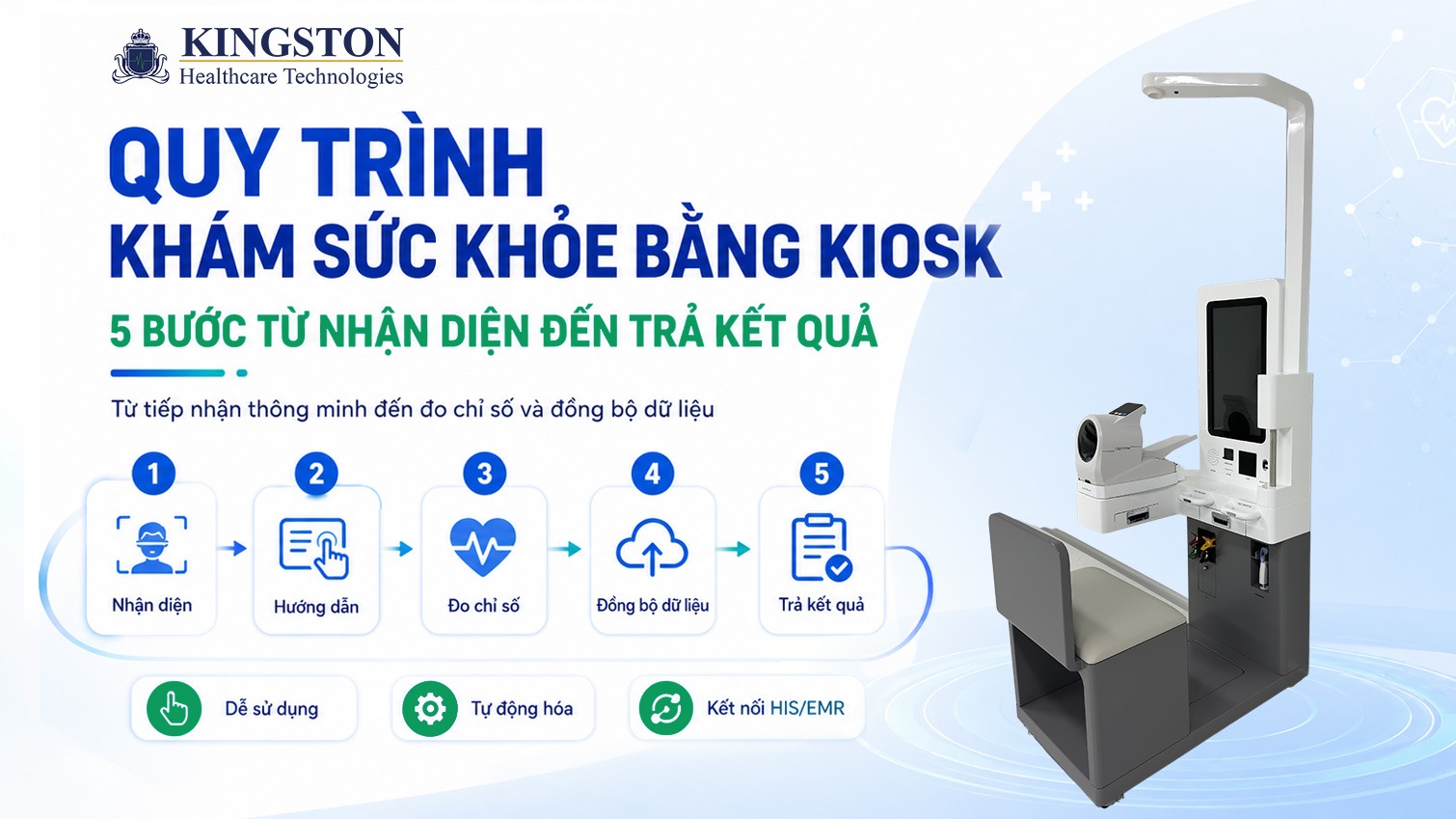
5 steps of the health check-up process using a kiosk, from user identification to returning results.
Step 1: Identifying the user
The process begins by verifying the user's identity. Depending on each unit's configuration and system, users can register using:
- ✅Citizen ID card.
- ✅QR code or electronic identification account.
- ✅Patient code.
- ✅Phone number.
- ✅Employee code or check-up program code.
For users who already have a record, the system can retrieve existing information instead of requiring it to be re-entered from scratch. This is especially suitable for periodic health check-up programs at businesses or healthcare facilities with a large number of returning patients.
The identification step is designed to be simple: users scan a code, place their documents in the guided position, or enter the necessary information on the screen. After confirmation, the system moves to the next measurement step.
Not every project is required to use a citizen ID card or VNeID. The identification method should be chosen based on each unit's infrastructure, operating process, and data management requirements.
🖥️ Step 2: Visual guidance on screen
After successful identification, the kiosk screen displays instructions for each measurement.
This is an important factor that makes the process more convenient for elderly people and those unfamiliar with digital devices.
The kiosk interface should use:
- ✅Short, clear instructions.
- ✅Illustrative images or videos.
- ✅Easy-to-read font size.
- ✅Clear action buttons.
- ✅Few data entry steps.
- ✅Notifications when posture or actions are incorrect.
In addition to the interface, ergonomic design also needs attention. The position of the screen, seating, blood pressure cuff, sensors, and scale platform must be arranged appropriately to suit a wide range of users.
In the early stages of deployment, healthcare facilities should have staff on hand to assist elderly people, people with disabilities, or first-time users. Once familiar with the sequence of steps, users can complete many basic measurements on their own in subsequent visits.
📊 Step 3: Automatically measuring health indicators
The kiosk performs measurements in the established sequence. With KHT's Medi-Kiosk, the configuration can be selected based on each unit's screening goals and operational needs. This is the step that allows the health check-up process using a kiosk to completely eliminate manual measurement.
Basic indicators may include:
- ✅Height.
- ✅Weight.
- ✅BMI.
- ✅Blood pressure.
- ✅Heart rate.
- ✅SpO₂.
- ✅Body temperature.
Some expanded modules such as body composition analysis, ECG, or metabolic indicators can be considered depending on the project's specific configuration.
During measurement, the system guides users to place their hands, stand, or sit in the correct position. If the signal is unstable or the action is invalid, the kiosk may ask the user to adjust and try again.
Connecting the devices at a single station helps reduce the need to move between multiple separate measurement stations. Results are also recorded directly in the system, reducing the need to read and manually re-enter data.
🔄 Step 4: Syncing data to the management system
After the measurement is completed, the data is transferred to the management platform and linked to the user's record. As a result, the health check-up process using a kiosk ensures that data remains consistent across systems.
Depending on the scope of deployment, data from Medi-Kiosk can be studied for connection with:
- ✅Hospital Information System (HIS).
- ✅Electronic Medical Records (EMR).
- ✅Electronic health records.
- ✅Administration portal for healthcare staff.
- ✅Telehealth platform.
- ✅Corporate health management system.
Automatic syncing helps reduce repetitive data entry, lowers the risk of recording incorrect indicators, and makes it easier for doctors or healthcare staff to access results.
However, it should not be assumed that a kiosk can immediately connect with every HIS or EMR system. Integration capability depends on the API, data structure, user identification method, and security requirements of each unit.
Before deployment, the KHT team and the customer's IT department need to conduct a survey, agree on data fields, and test the connection.
📋 Step 5: Returning results and directing the user
After the data is recorded, the kiosk can return results in several ways, depending on the configuration:
- ✅Displaying on the screen.
- ✅Printing a results slip.
- ✅Providing a QR code for lookup.
- ✅Sending to a personal app or portal.
- ✅Saving to the electronic health record.
The results display can show the measured indicators, the time taken, and any information that needs attention.
Depending on the healthcare facility's process, the system can also direct users to:
- ✅Go to the next examination room.
- ✅See a nurse.
- ✅Repeat a measurement.
- ✅Move to the testing area.
- ✅Connect with a doctor via Telehealth.
If a result falls outside the reference range or the signal quality is insufficient, the kiosk may suggest a re-measurement or forward the information to healthcare staff.
The kiosk only supports initial data collection, screening, and direction; the device does not diagnose diseases or issue treatment instructions on its own.
⚠️ Important note: Medical devices are for reference purposes only; measurement results should be compared with a specialist doctor's opinion.
⏱️ Timeline comparison: health check-up process using a kiosk vs. traditional process
The role of healthcare staff in the new process
A kiosk does not replace healthcare staff but changes their role: from repeating manual measurement and data entry tasks to supervising and assisting users who need help (the elderly, people with disabilities, first-time users), and focusing on professional consultation based on available data instead of spending time collecting it.
Head nurses and clinic operations staff often describe this as reducing repetitive workload while increasing meaningful interaction time with patients. This is also the biggest difference when deploying a health check-up process using a kiosk at healthcare facilities.
This topic will be explored in more depth in a dedicated article on whether kiosks replace healthcare staff, expected to be published in the same content cluster. These are key factors for evaluating the effectiveness of a health check-up process using a kiosk in practice.
If your organization is considering deploying a health check-up process using a kiosk, Kingston can help advise on designing a process suited to your scale and operational characteristics.